


close
Choose Your Site
Global
Social Media
Views: 222 Author: HLun PACK Publish Time: 2026-05-28 Origin: Site


Content Menu
● Why Safe PC Shipping Matters More Than Ever
● Step‑by‑Step: How to Pack a PC for Shipping
>> Identify Fragile Components
>> Gather Professional‑Grade Packing Materials
>> Disassemble and Protect Key Components
>> Stabilize the Interior of the Case
>> Choose the Right Box and Consider Double‑Boxing
>> Fill Void Spaces with Paper‑Based Cushioning
>> Label and Document the Shipment
● Shipping Insurance and Cost Optimization
>> When to Buy Shipping Insurance
>> How to Control Shipping Costs
● Sustainable PC Shipping: Paper Packaging as a Strategic Advantage
>> Why Paper‑Based Packaging Works for PCs
>> How HLun Pack / Pakoro Supports Electronics Brands
● Real‑World Example: Reducing Damage Rates for Refurbished PCs
● When to Choose Professional Packaging Support
Shipping a PC safely is not just about putting it in a box—it's about controlling shock, vibration, and static with the right packaging design, materials, and process. As a paper packaging equipment manufacturer working with electronics brands worldwide, I've seen the difference that well‑engineered paper‑based packaging makes to PC survival rates in transit. [blog.bradyplus]
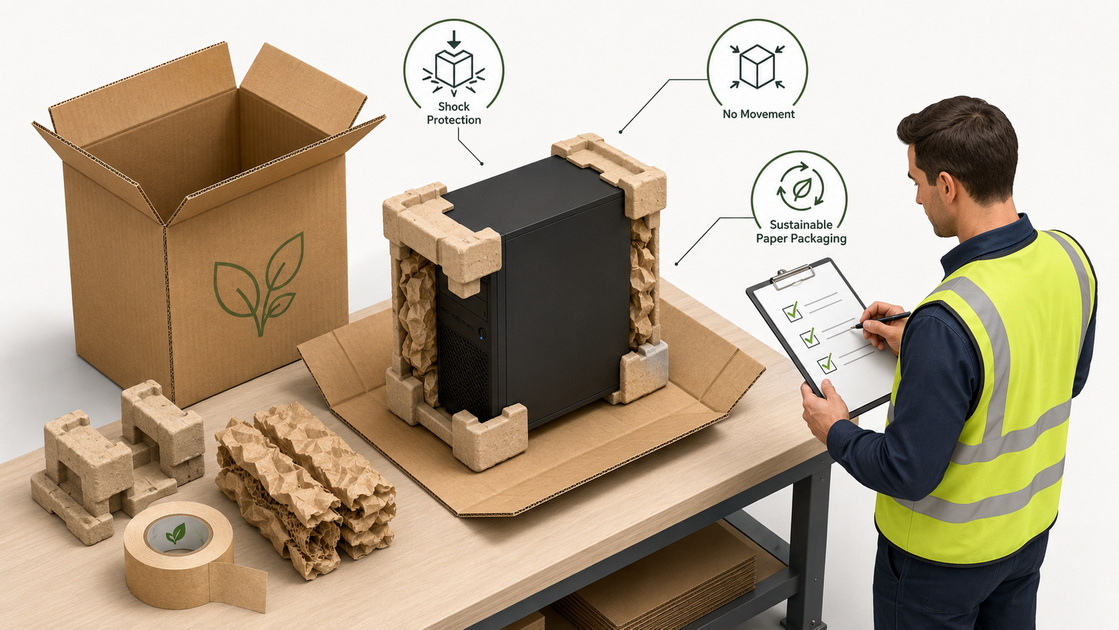
From custom gaming rigs to office workstations, a PC is both a high‑value asset and a critical data container. Even a single drop in the parcel network can crack a GPU, damage a motherboard, or destroy a drive holding irreplaceable files. [packlane]
- Higher transit risks: Modern e‑commerce and cross‑border logistics mean more sorting hubs, conveyors, and vehicle transfers per shipment. [blog.bradyplus]
- Delicate components: GPUs, large air coolers, glass panels, and HDDs are especially vulnerable to impact and vibration. [packlane]
- Data and downtime costs: For businesses, a damaged PC can halt production, support, or design work and trigger expensive downtime. [move]
Bottom line: your packaging must be designed to absorb shocks and prevent movement—not rely on the courier being gentle. [packlane]
- Use a strong, right‑sized box with paper‑based cushioning to absorb shocks and prevent movement. [move]
- Disassemble and protect fragile components like the GPU, RAM, and HDD/SSD, ideally in anti‑static bags and cushioned pockets. [packlane]
- Double‑box high‑value systems and clearly label the outer box as "Fragile" and "This Side Up." [youtube]
- Document and insure valuable PCs, especially custom builds and enterprise workstations. [packlane]
- Choose packaging that balances protection and sustainability, favoring paper‑based inserts over loose plastic void fill where possible. [s-lab]
This process combines what we recommend to our own electronics customers with best practices used by leading packaging brands. [move]
Before you touch a screwdriver, protect your data. [packlane]
1. Back up critical data to the cloud or an external drive.
2. Power down completely, disconnect from power, and hold the power button for a few seconds to discharge residual electricity.
3. Remove all peripherals (keyboard, mouse, cables, USB drives) and pack them separately. [move]
This step avoids data loss and prevents cables from stressing ports in transit. [move]
Open the side panel and identify parts that are most likely to fail under shock or bending forces. [packlane]
- Long or heavy graphics cards
- Large tower CPU coolers or AIO radiators
- Traditional 3.5‑inch hard drives (HDDs)
- Tempered glass panels
If the PC will travel by air or via standard parcel networks, assume it will experience multiple drops from 60–90 cm and design your packaging accordingly. [move]
For best results—and to reduce plastic—use a mix of paper‑based packaging and ESD‑safe materials. [s-lab]
Recommended materials:
- Anti‑static bags for GPU, RAM, motherboard, and drives
- Kraft paper or molded paper cushions to line the box and fill voids
- Die‑cut corrugated inserts or corner blocks to immobilize the chassis
- Bubble wrap or foam only where absolutely necessary for delicate parts
- High‑tack paper‑based packaging tape for sealing seams
- Double‑wall corrugated shipping boxes, rated for the PC's weight
As a paper packaging manufacturer, we typically design custom corrugated inserts that lock the chassis and component boxes in place, so nothing can move even under heavy vibration. [blog.bradyplus]
Most shipping damage we see occurs when heavy parts flex the motherboard or when drives experience shock. [move]
Disassemble carefully:
- Remove the GPU, large CPU coolers, and any loose HDDs.
- Take out extra RAM sticks if they're tall or loosely supported.
- Detach tempered glass panels if they are only lightly secured. [youtube]
Protect each part:
- Place each component into an anti‑static bag.
- Add a layer of kraft paper or bubble wrap around the bag and secure with tape.
- For HDDs, ensure they have cushioning on all six sides when boxed. [packlane]
Pack these protected components either:
- In their original product boxes, or
- In small custom cartons with paper padding, then place them around the PC chassis in the main shipping box. [packlane]
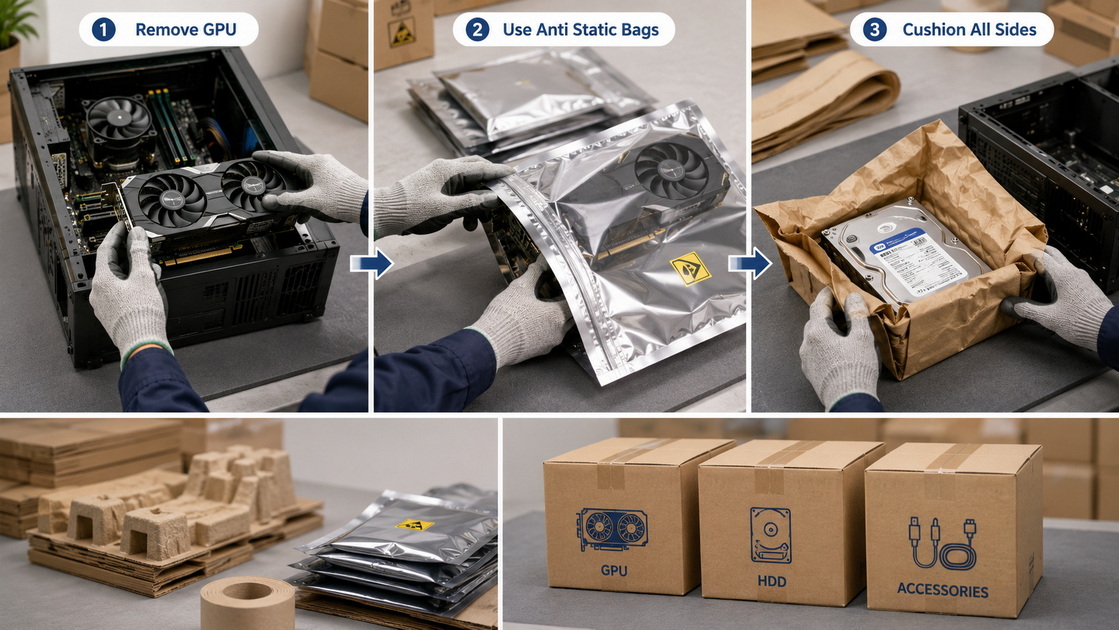
If you leave some parts installed (for example, a compact GPU and SSD), immobilize them. [packlane]
- Fill the interior voids around the GPU and CPU cooler with crumpled kraft paper or low‑density foam, ensuring nothing sharp contacts the PCB.
- Avoid overly rigid foam blocks pressing on the motherboard; the goal is to support, not stress components.
- Re‑install the side panel securely.
This technique mimics what PC brands and integrators use for shipping pre‑built systems. [youtube]
A properly sized box is as important as the cushioning. [move]
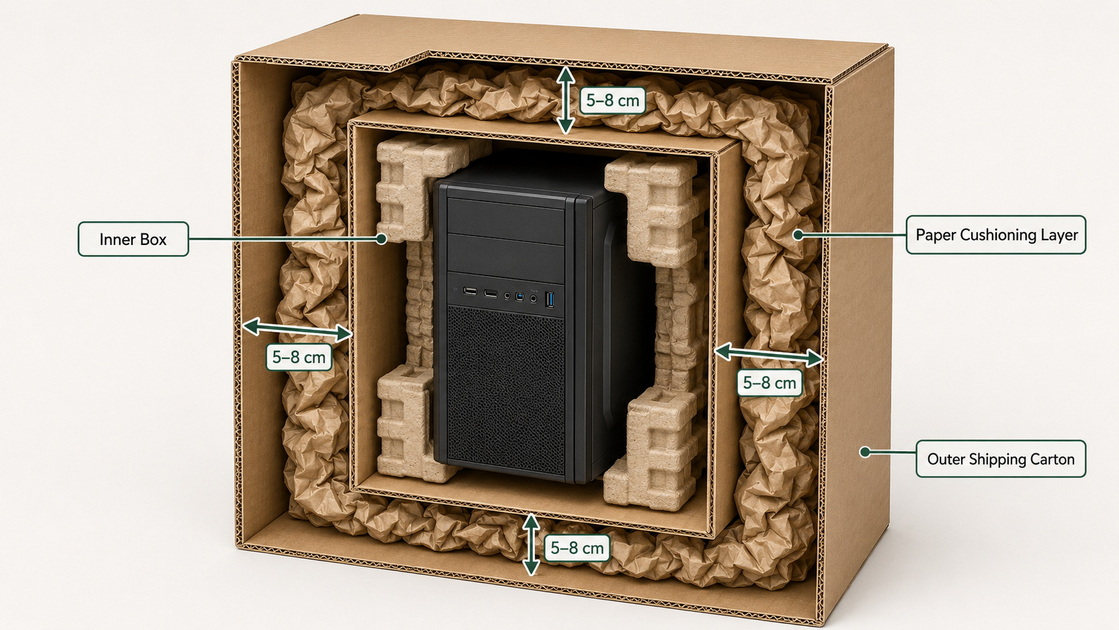
- Use a double‑wall corrugated outer box rated for the weight of the PC.
- The inner box (for the chassis) should allow 5–8 cm of cushioning on every side.
- For high‑value rigs, use the double‑boxing method:
- Box 1: PC chassis and component boxes with internal cushioning.
- Box 2: Larger outer carton with 5–8 cm of paper cushions or engineered inserts all around Box 1. [youtube]
This double‑box approach dramatically improves performance in drop tests by spreading impact forces across multiple layers. [packlane]
Movement is the enemy. Your goal is zero rattle when you shake the box gently. [move]
- Line the bottom of the box with compressed kraft paper pads or molded paper inserts.
- Place the PC case in the center, glass side oriented away from the most likely impact face. [youtube]
- Surround it with pre‑engineered corrugated inserts and crumpled paper pads to fill all voids.
- Place smaller component boxes in remaining spaces, cushioned on all sides.
Avoid loose fill like traditional peanuts where possible; paper cushions are easier to control, more sustainable, and perform predictably in compression tests. [s-lab]
A strong seal keeps the structure intact during conveyor and manual handling. [youtube]
- Use the H‑taping method: one strip along the main seam and two across the edges, forming an "H." [youtube]
- Reinforce bottom seams and any manufacturer's joints with extra tape.
- For heavier gaming PCs, consider strapping or banding if applicable to your logistics flow.
If you operate a warehouse or fulfillment line, this step can be automated with carton sealing equipment integrated into your packaging workflow.
Labeling and documentation are not just administrative—they support claim handling and safer processing. [youtube]
On the outside of the box:
- Clearly print the sender and recipient addresses.
- Add "Fragile – Electronic Equipment" and "This Side Up" arrows on multiple faces.
- If applicable, add battery warning labels for systems with large internal batteries or accessories. [youtube]
For your records:
- Photograph the packed PC and its components before closing the box.
- Keep a simple checklist of what you removed (GPU, drives, cables) and how it was packed.
These records support insurance claims and build trust with customers when shipping is part of a professional service.
Insurance and cost control are often overlooked but vital for businesses. [packlane]
Consider shipping insurance if:
- The PC is a high‑end gaming system, workstation, or custom build.
- You are shipping B2B equipment to customers or partners.
- Replacement cost or downtime impact is significant. [packlane]
Check each carrier's coverage limits, conditions for fragile electronics, and documentation requirements. [packlane]
You can protect your PC without overspending:
- Pack efficiently: Avoid oversized cartons that drive up volumetric weight.
- Compare carriers and services: Ground vs. air, standard vs. express.
- Leverage automation and right‑sized boxing: Using packaging machinery and custom die‑cut boxes reduces material waste and shipping cost over time. [blog.bradyplus]
As a packaging equipment manufacturer, we help clients configure right‑sizing systems that automatically produce cartons tailored to each PC or batch, lowering both damage and freight costs.
In 2026, brands are under pressure to reduce plastic and improve recyclability, especially in electronics packaging. [s-lab]
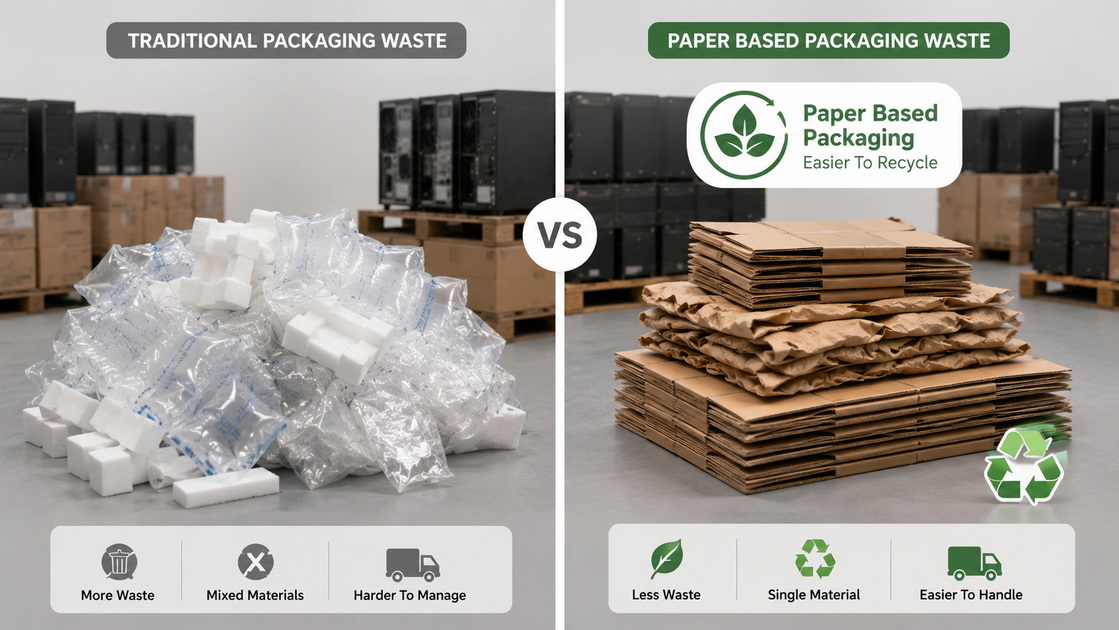
Modern paper solutions can match or outperform traditional plastic void fill in many PC shipping scenarios:
- High energy absorption with engineered paper cushions and corrugated inserts.
- Excellent stack strength from double‑wall and triple‑wall corrugated boards.
- Easy recyclability, improving your sustainability metrics and customer perception. [s-lab]
Paired with anti‑static bags for sensitive components, paper‑based packaging can protect PCs while aligning with ESG goals. [s-lab]
As a paper packaging equipment and solution provider, we work with PC assemblers, refurbishers, and repair centers to:
- Design custom PC shipping kits (outer cartons, inserts, documentation pockets).
- Integrate automated case erectors, cushioning machines, and sealing systems.
- Run drop, vibration, and compression tests to validate packaging performance before rollout. [blog.bradyplus]
This partnership approach helps brands reduce damage rates, packaging cost per unit, and environmental impact simultaneously.
One of our clients, a refurbished PC seller, initially shipped systems in generic boxes with mixed plastic void fill and reported a high damage and return rate. [move]
After transitioning to:
- Custom right‑sized corrugated cartons,
- Molded paper corner blocks for the chassis,
- Standardized anti‑static component kits,
they saw a significant reduction in transit damage and fewer support tickets related to broken GPUs and cracked cases. This type of improvement is typical when packaging is treated as engineering rather than an afterthought. [s-lab]
You may want to engage an expert packaging partner like HLun Pack / Pakoro if:
- You ship PCs or electronics at scale (e‑commerce, B2B, RMA/repair).
- You are facing damage, return, or warranty issues linked to shipping.
- You want to standardize sustainable packaging across SKUs.
We can analyze your current packaging, run test shipments, and propose custom paper‑based packaging solutions and machinery tailored to your PC portfolio.
Call to action:
If you're ready to ship PCs more safely, sustainably, and cost‑effectively, contact our packaging team to design a paper‑based solution and workflow that fits your operation.
1. Can I use any box to ship my PC?
You should avoid random, single‑wall boxes; instead, use a double‑wall corrugated box sized to allow 5–8 cm of cushioning on all sides. Flimsy or oversized boxes are a major cause of shipping damage. [packlane]
2. Do I really need to remove the graphics card?
For most long or heavy GPUs, yes. Removing the card and packing it separately in an anti‑static bag with cushioning significantly reduces the risk of motherboard damage or PCIe slot cracking during drops. [packlane]
3. Is paper‑based packaging enough to protect a PC?
When correctly engineered—using **double‑wall cartons, die‑cut inserts, and kraft paper cushions—paper‑based packaging can protect PCs in typical parcel networks while improving recyclability and sustainability performance. [blog.bradyplus]
4. How can I tell if my PC is packed tightly enough?
After sealing the box, gently shake it. You should hear no movement at all. If anything rattles, open the box and add more paper cushions or adjust the inserts. [youtube]
5. What special steps are needed for international PC shipments?
For international shipping, add extra cushioning, check import and battery regulations, and strongly consider shipping insurance due to longer transit times and more handling points. Clear labeling and documentation are especially important. [packlane]
1. Pakoro. "How to Ship a PC Safely: Packaging Tips."
https://pakoro.com/blog/how-to-ship-a-pc-safely%EF%BC%9A-packaging-tips/[Pakoro]
2. Packlane. "How to Ship a Computer Safely: A Step-by-Step Tutorial."
https://packlane.com/blog/how-to-ship-a-computer-safely/ [packlane]
3. Move.org. "The Only Guide to Packing and Moving Electronics You'll Ever Need."
https://www.move.org/moving-packing-electronics/ [move]
4. BradyPlus. "What's Hot: Trends Driving the Packaging Industry in 2026."
https://blog.bradyplus.com/whats-hot-trends-driving-the-packaging-industry-in-2026 [blog.bradyplus]
5. S‑Lab. "Best Sustainable Packaging Solutions for Businesses: 2026 Guide."
https://s-lab.bio/sustainable-packaging-solutions-2026/ [s-lab]
6. YouTube – "How To Ship Electronics (4 Minute Guide)."
https://www.youtube.com/watch?v=nYVcMR1gLZA [youtube]
7. YouTube – "Safely pack and ship a gaming PC or computer."
https://www.youtube.com/watch?v=pqRyL8S1yfI [youtube]


