


close
Choose Your Site
Global
Social Media
Views: 222 Author: Amanda Publish Time: 2026-02-02 Origin: Site


Content Menu
● What Is Product and Packaging Photography (And Why It Matters)?
● Plan Your DIY Product and Packaging Photoshoot
>> Define Your Objective and Platforms
● Use Your Smartphone Camera Like a Pro
>> Minimum Technical Requirements
● Choose Backgrounds and Create Visual Stories
>> Clean Backgrounds for Clarity and Versatility
>> Use Color and Scenes to Tell a Story
● Show All Product and Packaging Variations
>> Make Comparison Easy for Customers
>> Highlight Confidence in Your Full Product Line
● Experiment With Angles for More Engaging Images
>> Capture Key Features and Finishes
>> Work With Natural Light and Shadows
● Essential Lighting Tips for DIY Packaging Photography
>> Natural Light vs Artificial Light
>> Control Shadows and Reflections
● Composition Techniques That Make Packaging Photos Stand Out
>> Use Leading Lines and Depth
● Editing for a Professional Finish
>> Maintain Color Accuracy and Brand Consistency
● Simple Comparison of Shooting Elements
● Turn Great Photos Into a Stronger Packaging Experience
● FAQs About DIY Product and Packaging Photography
>> 1. Do I really need a professional camera for good packaging photos
>> 2. How many photos should I take for each product
>> 3. What is the best time of day to shoot with natural light
>> 4. How can I make my packaging colors look accurate
>> 5. How often should I update my product photos
Creating high-impact product and packaging photos is one of the fastest ways to boost conversions, earn trust, and build a recognizable brand online.
In this enhanced guide, you will learn step by step how to plan and shoot DIY product and packaging photography that looks professional, tells your brand story, and helps customers buy with confidence.
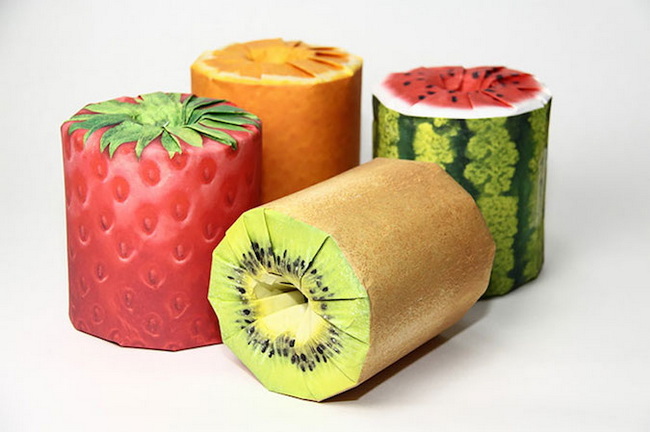
Product and packaging photography is the process of photographing your products and their packaging to showcase quality, features, and brand personality across your website, eCommerce platforms, and social media.
Strong visuals matter because:
- Customers use images to judge quality and trustworthiness before reading text.
- Photos act as your digital salesperson when shoppers cannot touch or feel the product.
- Misleading or low-quality images often lead to negative reviews, returns, and lost sales.
Core SEO keyword focus: DIY product and packaging photography, product packaging photos, packaging photography tips, smartphone product photography.
Before you pick up your camera, invest time in planning. It will make your shoot smoother and your images more consistent.
Ask yourself:
- Is the shoot for eCommerce product pages, social media, or print catalogs
- Do you need clean, white-background images, lifestyle scenes, or both
- How many SKUs and packaging variations must be covered in one session
This helps you define shot lists and file requirements such as dimensions, formats, and aspect ratios.
A basic shot list for DIY product and packaging photography might include:
1. Front view of the packaging.
2. Back view with ingredients or specifications.
3. Close-up of key features such as texture, closures, or finishes.
4. Group shot of all variations such as sizes, colors, or flavors.
5. Lifestyle scene with the product in use.
Having a list prevents missed shots and keeps your images consistent across the site.
You do not need a high-end DSLR to get professional-looking packaging photos. Modern smartphones can capture excellent results when used correctly.
For sharp, high-quality images:
- Use a smartphone with at least 12 megapixels to ensure crisp detail and flexibility for cropping.
- Avoid fully automatic modes and adjust exposure, focus, and white balance manually when possible.
- Use the rear camera instead of the front camera for better optics and resolution.
Blurry images instantly make your brand feel less professional. To avoid this:
- Use a tripod or smartphone stabilizer to keep the camera steady.
- If you do not have a tripod, brace your elbows on a table or wall while shooting.
- Use a timer or remote shutter to avoid shake when tapping the screen.
For small products such as jewelry, consider clip-on macro lenses that help you capture fine details clearly.
Your background has a direct impact on how customers perceive your product and brand.
A simple white or neutral background:
- Keeps the focus on the product and packaging.
- Works well for marketplaces that require white backgrounds.
- Makes it easier to remove or replace backgrounds later during editing.
You can create a basic setup with white foam boards, a roll of white paper, or a lightbox.
Bold colors or textured surfaces can make your packaging photography stand out and reinforce your brand.
Try:
- Solid colored backdrops that contrast with your packaging so it pops on screen.
- Natural surfaces such as wood, linen, or stone to suggest warmth, sustainability, or luxury.
- Lifestyle scenes that show the product in context, helping customers imagine using it.
For example, placing tea packages with a cup of tea and dessert on a table immediately conveys comfort, self-care, and flavor variety.
One recurring mistake in product and packaging photography is only showing a single variant.
Displaying all variations together helps shoppers:
- Quickly understand the full range such as flavors, colors, or sizes.
- See how the packaging design links the collection as a family of products.
- Choose the variant that best suits their preferences without guessing.
For example, a coffee brand that shows all flavors side by side in one image makes decision-making faster and encourages multi-item purchases.
By photographing every variation, you signal that you are confident in your entire range rather than only one hero product.
You can:
- Shoot a hero group shot with all variants.
- Then add individual shots of each item for detailed product pages.
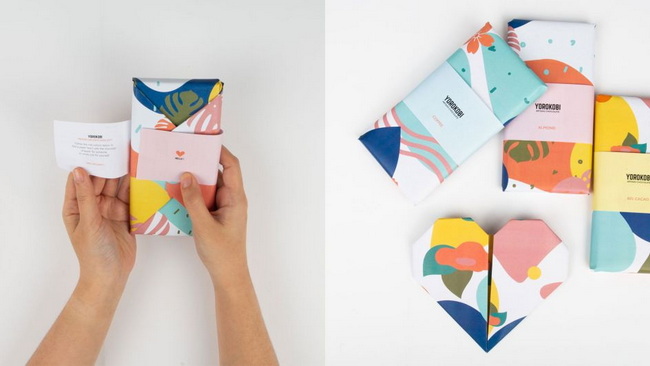
Images taken at standard eye level can look flat and uninteresting. Angles add depth, drama, and information.
Experiment with:
- Forty five degree angles to show both the front and one side of the packaging.
- Top-down shots for sets, bundles, or flat-lay compositions.
- Close-ups of structural features such as handles, tuck-in closures, or windows and premium finishes such as foiling or embossing.
This helps online shoppers understand details they cannot touch in person.
When you rely on natural light, you cannot control the direction of the sun, but you can control your angles.
Rotate or tilt your product to:
- Soften harsh shadows on key details.
- Create gentle, pleasing gradients on surfaces.
- Avoid reflections that hide important information.
For packaging boxes, shooting them from multiple angles shows shape, depth, and print on different panels, giving customers a more complete feel of the product.
Lighting is one of the most important elements in DIY product and packaging photography.
- Natural light near a window is soft, flattering, and free. It works great for lifestyle scenes and most packaging.
- Artificial light such as LED panels, softboxes, or light tents offers more control and consistency, especially for large catalog shoots.
Whichever you choose, keep the direction of light consistent across all images for a unified brand feel.
To improve lighting:
- Use white foam boards as reflectors to fill in dark shadows.
- Place products at a forty five degree angle to the light source, not directly facing it.
- Avoid mixing different color temperatures such as daylight and warm lamps in the same shot.
This helps your packaging colors look accurate and trustworthy, which is crucial for brand perception.
Even simple products look premium when you apply basic composition rules.
Divide your frame into a three by three grid and place key elements along the lines or their intersections.
This:
- Creates more dynamic images.
- Gives space for copy or design overlays in marketing materials.
Many smartphone cameras offer a built-in grid to help with this.
To add visual interest:
- Arrange multiple boxes so that their edges create lines guiding the viewer's eyes to your main product.
- Layer products in the foreground, middle, and background to create depth and a more immersive feel.
Once you have your images, editing gives them a polished, consistent look.
Focus on:
- Cropping and straightening so horizons and box edges look clean.
- Adjusting exposure, contrast, and white balance to match real-life colors.
- Slight sharpening to enhance text and packaging details.
Free tools and mobile apps can handle most of these tasks for DIY workflows.
Do not over-edit. Your packaging photography must reflect the true nature of your products, including colors, materials, and finishes.
Accurate photos:
- Reduce returns from customers who feel misled.
- Protect your reputation and review score.
Aspect | Basic DIY Approach | Pro-Level Enhancement Idea |
Camera | Smartphone, 12MP plus, rear camera | Mirrorless camera with prime lens |
Stability | Tripod or stabilizer | Remote trigger and heavy tripod |
Background | White paper or foam board | Modular studio backdrop system |
Lighting | Window light with reflectors | Dual softbox or LED panel setup |
Angles | Front, side, and top-down | Full 360 degree sequence and macro detail shots |
Editing | Mobile app corrections | Color calibrated workflow and batch processing |
High-quality product and packaging photography performs even better when matched with the right packaging materials and structural design.
If you are ready to:
- Upgrade your unboxing experience.
- Align your packaging design with your brand story.
- Ensure your products look as good in real life as they do in photos.
Then partner with HLun Pack for professional packaging materials, packaging machinery, and end to end packaging solutions that are designed to photograph beautifully and perform reliably in real world logistics. Contact our team today to discuss a packaging solution that supports your brand's visual strategy from production line to product photoshoot and helps your next photoshoot deliver even stronger business results.
Contact us to get more information!
No. A modern smartphone with at least 12 megapixels, used with a tripod and good lighting, is enough to create high-quality product and packaging photography for most online needs.
Aim for at least five to eight images per product, including front, back, side, close-up of key features, group shot with variations, and at least one lifestyle image showing the product in use.
Shoot during early morning or late afternoon when light is softer and more flattering. Avoid harsh midday sun, which can create strong shadows and blown-out highlights.
Use consistent lighting, avoid mixing light sources, and adjust white balance carefully in editing so that the packaging color on screen matches the physical product as closely as possible.
Update them when you change packaging design, launch new variants, or significantly improve your visual style so your catalog feels current and consistent with your brand identity.
Estimated article word count: approximately 1,850 words.
1. https://packmojo.com/blog/4-tips-for-diy-product-and-packaging-photography/


